
Your books, your hardware.
A self-hosted audiobook and ebook library. Word-level audio-text sync, AI question-answering over your library, and cross-device playback — running on a server you control. We don't have your books. We can't lose them, change them, or take them away.
You run Abookify on one machine you control — your own computer, or a home server. Your phones and browsers then connect to it. There's no account and nothing to sign up for.
Get Abookify free & open sourceWhat it does
You own this
Open-source server (AGPL-3.0). Open file format. Open relay. Pick your own tunnel — NullBore, Tailscale, Cloudflare, or none at all.
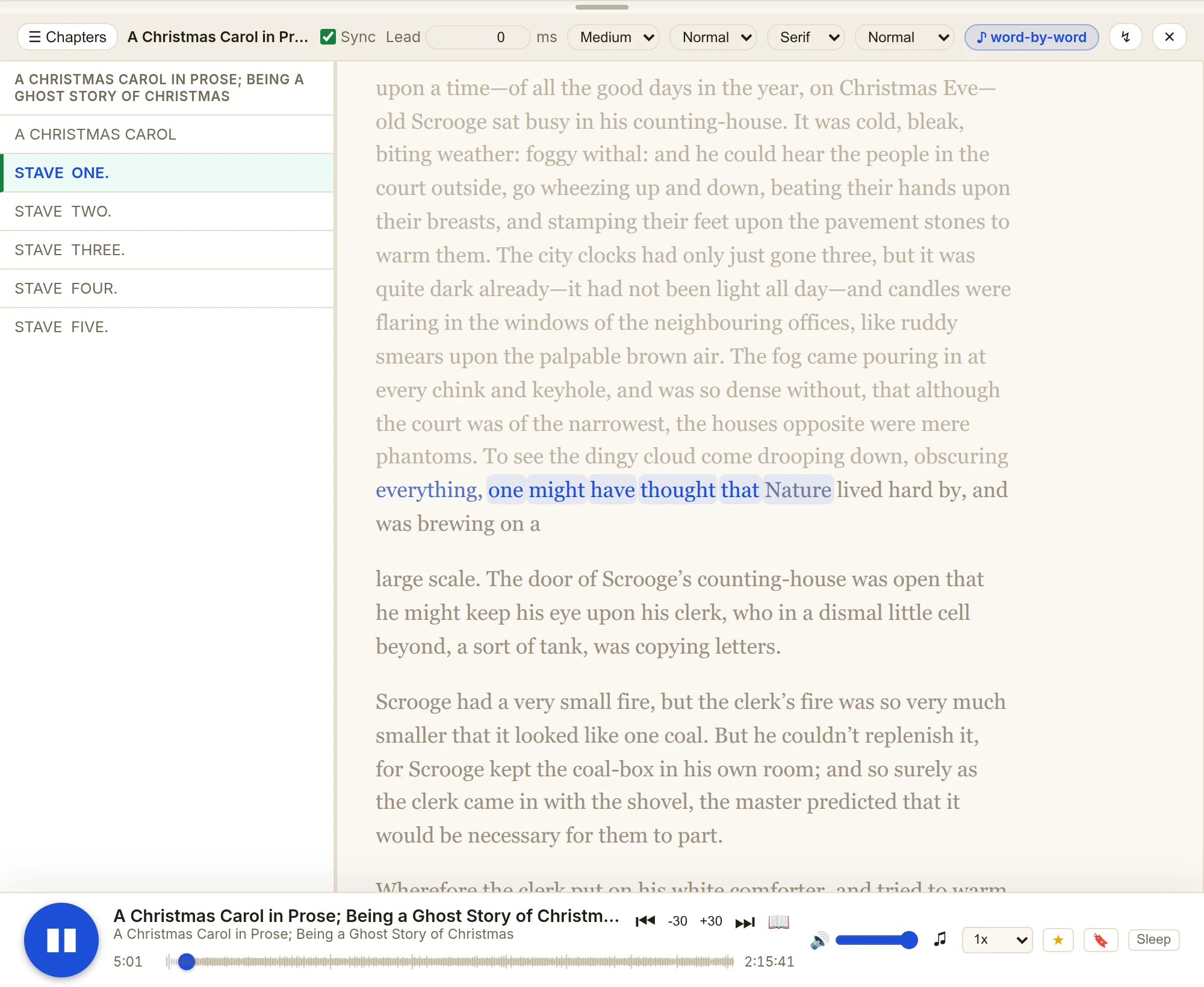
Word-level karaoke
See each word highlighted as it's narrated. Tap to seek.
Audio↔text alignment
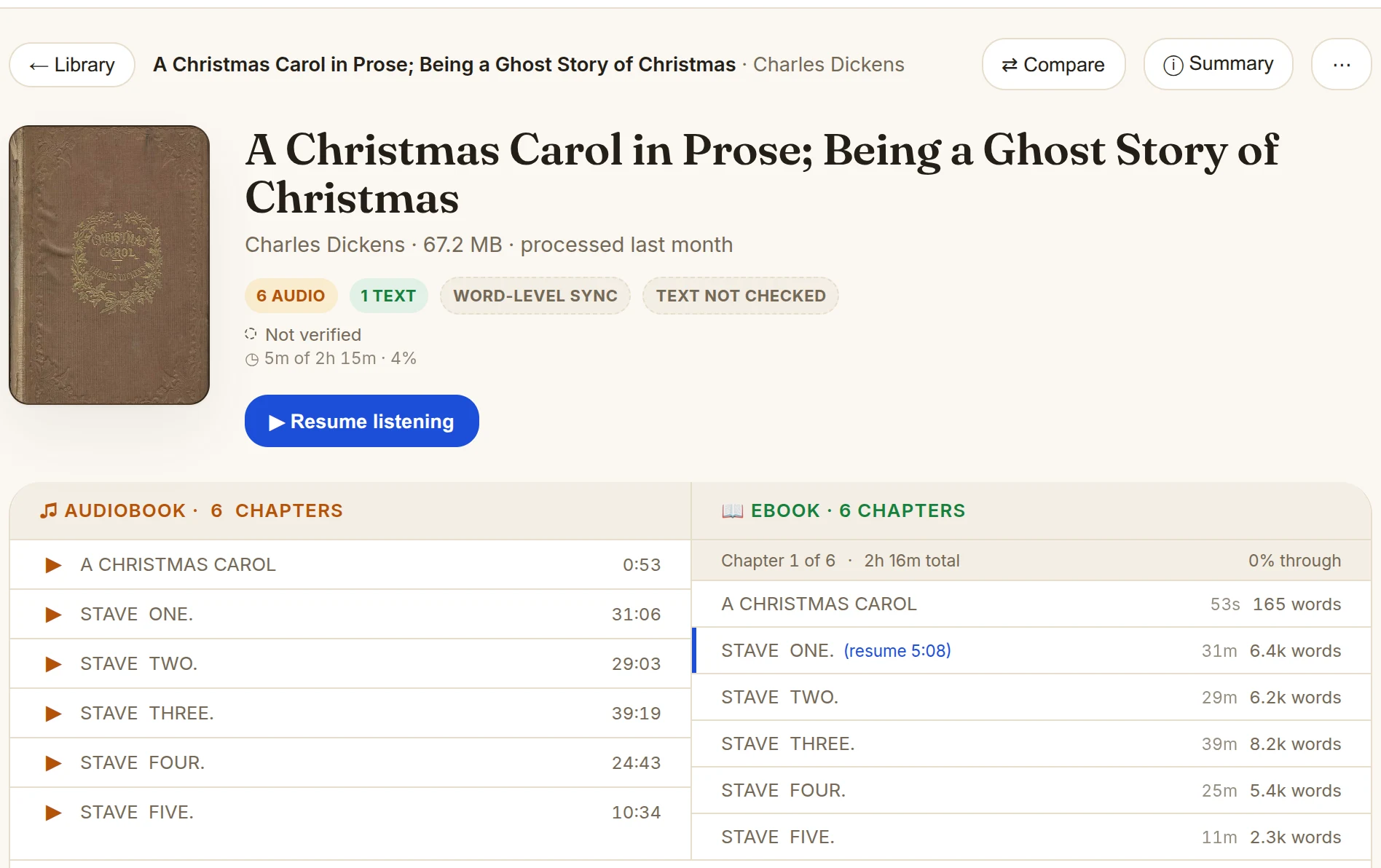
Match an audiobook to its ebook and read along, switching modes mid-chapter. A coverage score tells you how well the two actually line up — both how much of the recording is backed by text and how much of the book is narrated.
Ask your books
Q&A grounded in your library, with citations to the exact passage and audio timestamp. Scope a conversation to where you've read so the answers don't spoil what's ahead. Bring your own key.
Catch up without spoilers
A short "story so far" recap and per-chapter summaries, bounded to your current position — nothing past where you are.
Cast of characters
A per-book list of who's who, pulled from the text. Experimental — it's good at recall but can over-split names, so it's labelled as such everywhere it appears.
Cross-device sync
Web, iPhone, Android. Pick up where you left off on any device. The app remembers several servers, so one offline tunnel isn't a dead end.
Generate or import
Open-source TTS for ebook-to-audio. Whisper for audio-to-text, with optional GPU acceleration. Or just import what you already own.
Want the words to light up as you listen?
They do. Here it is on a real book — A Christmas Carol, narrated by Abookify — in the web reader. Nothing staged, nothing mocked.
Reading along, even across translations
Matching a spoken recording to a written book is the hard part, and we do it two ways depending on how closely the two actually correspond. When the audiobook and the ebook are the same edition, an anchor aligner locks them together word for word — that's what drives word-level karaoke, each word lighting up as it's narrated. When they diverge — a different translation, an abridgement, a looser reading — we match by meaning instead, using text embeddings and dynamic time warping to line up passages that say the same thing in different words. That gives a paragraph-level follow-along.
We pick the method by how well the two texts actually line up, and when they barely line up we say so rather than fake a precision that isn't there. The result is a ready-to-play timeline, so the reader can offer a simple choice: follow the exact words being narrated, or read the same passage in a translation you prefer.
Remote access, your choice
When you're away from home and your server's behind a router, you need a tunnel. Abookify doesn't care which one — the mobile app just takes a URL. Use NullBore (an open-source tunnel we integrate with), Tailscale, Cloudflare Tunnel, WireGuard, or a plain port forward. Nothing locks you in.
If you'd like one less thing to set up, paid app subscribers get a free hosted NullBore tunnel provisioned automatically. It's a convenience, not a requirement.
How you run it
The easiest way is the desktop app: download it, open it, and Abookify runs on your own machine — no Docker, no terminal, no account. It starts the reader and server in the background and opens straight to your library, and you can add books and start reading right away.
One thing worth knowing before you start. The part that makes Abookify different — word-level narration and transcripts of your own audiobooks — is done by a speech engine that runs entirely on your machine, not in anyone's cloud. That's the whole point of self-hosting: your books and your recordings never leave your computer. Switching it on is a one-time ~5 GB download — the speech engine plus its AI model — that the app fetches the first time you ask for narration. You can keep reading the whole time it installs, an honest progress bar shows exactly where it's at, and when it's done narration turns on by itself. Rather not download it? Point the app at your own cloud API key instead and nothing installs locally.
⬇ Download AppImage 84 MB · portable, double-click to run .deb 11 MB · Debian & Ubuntu
Mark the AppImage executable and double-click it, or install the .deb (sudo dpkg -i abookify_0.1.0_amd64.deb) and open Abookify from your apps.
⬇ Download .dmg Apple Silicon (M1 or later) · 10 MB · unsigned preview
Intel Mac? This build won't run on it — it's for Apple Silicon (M1 or later) only. Intel Macs can run Abookify with Docker until the universal build ships.
First launch takes one extra step, because this build isn't code-signed yet (our Apple certificate is in progress). It's the standard macOS warning for unsigned software, and you only see it once:
- Open the .dmg and drag Abookify into Applications.
- Double-click Abookify. macOS says it could not verify the app — click Done (not Move to Trash).
- Open System Settings → Privacy & Security and scroll to the bottom. Next to the message about Abookify, click Open Anyway, then confirm with your password or Touch ID.
- Abookify opens. From now on it launches normally.
⬇ Download .msi Windows 10/11, 64-bit · 11 MB · unsigned preview
Windows may show a blue warning the first time, because this build isn't code-signed yet (our certificate is being issued). It's the standard SmartScreen notice for new, unsigned software, and it only appears once:
- Double-click the .msi to start the installer.
- If a blue box says Windows protected your PC, click the small More info link, then Run anyway.
- Finish the installer and open Abookify from the Start menu.
No graphics card? That's fine — transcription runs on your CPU. It works, but a long audiobook can take a few hours, so it's best kicked off and left running in the background. A graphics card makes it many times faster. All downloads & release notes →
Prefer to run it with containers? Abookify also self-hosts as a set of Docker Compose services — the server plus local speech engines (Whisper for transcription, Kokoro for text-to-speech). One config file, no accounts, nothing leaves your machine. The setup guide walks a technical self-hoster through install, adding a library, remote access, and optional password protection.
Open source
The server is open source under AGPL-3.0 — read it, audit it, fork it, run it on your own hardware. Same goes for the relay integration code and the file format itself.
- abookify-server — the server (Go, AGPL-3.0)
- abookify-relay — relay setup + multi-tunnel docs (AGPL-3.0)
- abook-format — the .abook file format spec (CC BY-SA 4.0)
Self-hosting a product means trusting the software that runs on your hardware. We think you should be able to verify what it does.
Status
Abookify is in active development. The server, web interface, and CLI tools are functional today, with word-level sync, alignment, Q&A, and TTS/STT all working. The mobile app is in field testing ahead of TestFlight. The desktop app and a few features marked experimental in the app (like the cast-of-characters extractor) are still maturing. We'd rather ship honestly than overstate where things are.
Get in touch
Questions, feedback, or partnership inquiries: [email protected]